Mayumiotero – Interactive Display Technology is changing the way people think about digital screens. For years, screens mainly served one purpose: showing information. People watched television, viewed presentations, or read content while another device handled the controls. However, that relationship is becoming more direct. Modern interactive displays allow users to touch, write, draw, move objects, and navigate content on the screen itself. As a result, the display becomes part of the conversation rather than a passive surface. This change may appear simple, yet its impact is significant. A teacher can annotate a diagram during a lesson, while a team can edit ideas together during a meeting. Meanwhile, visitors can explore information through an interactive kiosk without assistance. In my view, this direct interaction explains why the technology feels natural so quickly. Instead of learning complicated controls, users often interact with digital information using familiar movements.
Read Also: Google Launches Gemini 3.7 Flash Just Three Weeks Later With Much Lower Pricing
From Passive Screens to Direct Digital Interaction
The transition did not happen overnight. Early digital displays focused heavily on image quality, brightness, resolution, and size. Those improvements remain important, but users now expect more than sharp pictures. Consequently, manufacturers have started treating interaction as another essential part of the viewing experience. Touch detection is one of the clearest examples. Depending on the system, a display may use capacitive, infrared, optical, or other sensing methods to determine where someone touches the surface. The software then translates that position into an action. Therefore, tapping an icon can open an application, while dragging a finger can move an object. Multi-touch support takes this idea further because several contact points can be detected at once. This makes zooming, rotating, writing, and collaborative work more practical. More importantly, it changes the user’s role. Instead of simply receiving information, the person can actively shape what appears on the screen.
How Interactive Displays Actually Work
Behind the smooth experience is a combination of hardware and software. First, the display panel presents the visual content. Next, a sensing layer detects touch or another form of input. A processor then interprets the action before the software produces the appropriate response. In simple terms, the process follows a continuous pattern: input, detection, processing, and visual feedback. Speed matters throughout this sequence. If a line appears noticeably after a stylus moves, writing can feel unnatural. Likewise, inaccurate touch detection can make buttons frustrating to use. For that reason, responsiveness and precision can matter as much as resolution. Modern systems may also include palm rejection, pressure-sensitive pens, wireless connectivity, speakers, cameras, and microphones. Together, these features turn a display into a broader computing platform. Therefore, evaluating an interactive screen only by its panel specifications can miss much of what makes the experience useful.
Classrooms Are Becoming More Visual and Collaborative
Education provides one of the clearest examples of this shift. A traditional whiteboard is simple and reliable, but its content is temporary unless someone records it. An interactive display can combine writing, video, diagrams, websites, presentations, and digital documents on one surface. For example, a science teacher can display a model of the solar system and annotate it during the explanation. Students can then approach the screen and move elements themselves. This creates a more active learning environment when the technology supports the lesson rather than distracting from it. Moreover, digital notes can often be saved or shared afterward. That continuity is valuable because classroom discussion does not have to disappear when the lesson ends. However, hardware alone does not improve education. Teachers still need clear objectives and suitable content. Interactive technology works best when it reduces friction and makes difficult concepts easier to explore.
Workplaces Are Turning Screens Into Shared Workspaces
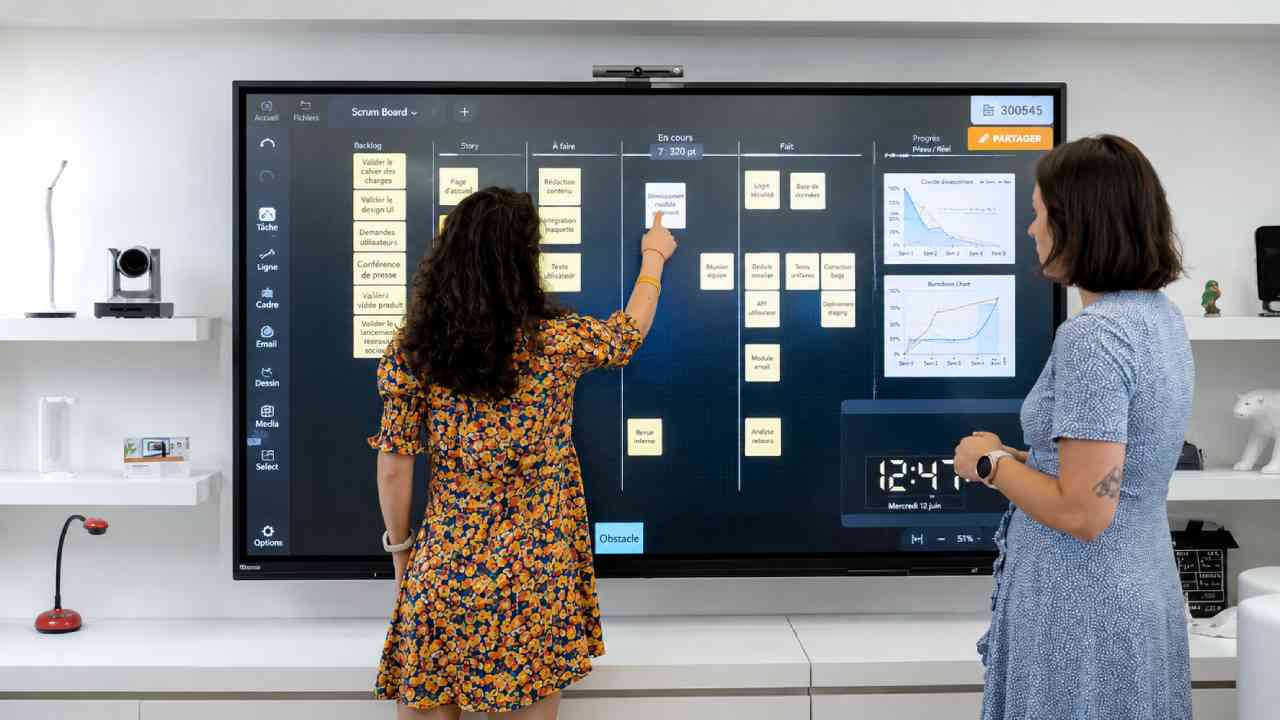
A similar transformation is happening in offices. Meeting-room displays once acted mainly as large monitors connected to laptops. Today, interactive models can function as collaborative workspaces where participants write notes, organize ideas, review documents, and communicate with remote colleagues. This becomes particularly useful for hybrid teams. Instead of one person controlling every slide, several participants can contribute to the same visual workspace. Consequently, brainstorming becomes less dependent on paper notes or separate devices. A designer might sketch an idea, while another colleague moves reference images beside it. Meanwhile, remote participants can follow the evolving discussion through connected collaboration software. The practical advantage is not simply that the screen is larger. Rather, the information becomes easier to manipulate collectively. In my assessment, that distinction matters because good collaboration technology should reduce barriers between an idea and the people trying to develop it.
Public Spaces Are Becoming Easier to Navigate
Interactive screens are also moving beyond classrooms and conference rooms. Airports, hospitals, museums, hotels, shopping centers, transportation hubs, and other public environments increasingly use digital interfaces to help visitors find information. Consider a large building with several floors. A printed directory can show where destinations are located, but an interactive system can provide searchable maps and step-by-step directions. Similarly, a museum display can allow visitors to explore additional images or historical details without placing every piece of information on a wall. Retail environments can use interactive screens for product discovery, while transportation systems can present route information in a more flexible format. Nevertheless, public displays need thoughtful interface design. Large buttons, readable typography, simple navigation, accessibility, and fast responses are crucial. Otherwise, additional features can create confusion rather than convenience. The best interactive display often feels simple precisely because much of its complexity remains invisible.
AI and Computer Vision Are Expanding What Screens Can Understand
The next stage becomes especially interesting when artificial intelligence enters the picture. Touch tells a system where a user makes contact, but AI and computer vision can potentially provide more context about the interaction. For instance, software can recognize handwriting and convert it into editable text. Cameras can support speaker framing during video meetings. Vision systems can also identify gestures, movement, or objects within their field of view. As these technologies improve, interaction may become less dependent on direct physical contact. A user could point, gesture, speak, or move naturally while the system interprets those actions. However, smarter sensing also raises important questions about privacy and data handling. Camera-based features should have clear purposes, transparent controls, and appropriate security measures. Therefore, progress should not be measured only by how much a screen can detect. It should also be measured by whether users understand and control what the system is doing.
Interactive Displays Are More Than Large Touchscreens
It is tempting to describe every interactive display as a giant touchscreen, but that comparison is incomplete. A touchscreen describes an input method, whereas a modern interactive display can combine several technologies into one system. These may include a high-resolution panel, multi-touch sensing, stylus input, wireless screen sharing, embedded computing, microphones, cameras, speakers, and collaboration software. As a result, two products with similar screen sizes may provide very different experiences. Latency, touch accuracy, viewing angles, software support, connectivity, security, and ease of maintenance all influence practical performance. The intended environment matters as well. A classroom may prioritize writing and educational software, while a corporate meeting room may need strong conferencing features. A public kiosk, by contrast, may require durability and a simplified interface. Therefore, choosing an interactive display should begin with the use case rather than the longest specification sheet.
Read Also: Logo and Branding Design Trends Shaping Modern Visual Identity
Gesture Recognition Could Reduce the Need for Touch
Touch remains the dominant interaction method, yet gesture recognition points toward another possibility. Cameras and depth sensors can observe movement and translate selected gestures into commands. In theory, this allows users to interact with digital content without constantly touching the display. Such an approach can be useful when the screen is difficult to reach or when contact-free interaction is preferred. However, gesture interfaces face a unique challenge: they must understand intentional movements without responding to every casual motion. Accuracy, environmental lighting, sensor placement, and interface design all influence the result. Therefore, gestures are unlikely to replace touch everywhere. Instead, they may become another input option alongside touch, voice, stylus, keyboards, and mobile devices. This multimodal approach is important because different situations require different controls. A successful system should let technology adapt to the user rather than forcing every user into one method of interaction.
Interactive Display Technology Is Moving Toward Spatial Computing
The broader direction becomes clearer when interactive displays are viewed alongside spatial computing. Traditional interfaces place digital information inside a rectangular screen. Spatial systems, meanwhile, attempt to understand the physical environment around the user. Technologies such as depth sensing, computer vision, augmented reality, mixed reality, and 3D mapping can connect digital objects with physical space. Interactive displays may become one component of that larger ecosystem. For example, information shown on a wall display could potentially continue on a tablet, headset, or smart glasses while maintaining the same digital workspace. This creates a more continuous relationship between devices. Yet the most valuable innovations will probably be the ones that solve real problems rather than simply appearing futuristic. Faster collaboration, clearer visualization, easier navigation, and more intuitive controls are practical benefits people can immediately understand. That practical value will determine how quickly spatial interaction moves beyond specialized environments.
The Future Screen May Understand More Than a Touch
The evolution of Interactive Display Technology suggests that the definition of a screen is becoming broader. Resolution and image quality will continue to improve, but interaction is increasingly becoming part of the display experience itself. Touch made digital content directly accessible. Stylus support made writing more natural. Meanwhile, AI, computer vision, gesture recognition, and spatial sensing are beginning to give systems more ways to interpret human intent. The result is not simply a smarter television or a larger tablet. Instead, the screen is developing into an interface where visual information and human action meet. Still, the strongest products will be those that keep interaction understandable. Technology should respond quickly, protect user data, and avoid unnecessary complexity. If those principles remain central, interactive displays could become increasingly common across education, business, healthcare, retail, transportation, and public spaces. The next logical development is Gesture Recognition Technology, where interaction begins to move beyond the surface of the screen itself.